The Future of Work is Keyless: Why Enterprises Are Switching to Digital Wallet Passes

Updated: Oct 27
If you have ever worked in a corporate office, you know the drill: on your first day, you wait for HR to take your photo, print a plastic PVC card and code your access badge. When you forget it at home, you spend 15 minutes at the security desk getting a temporary paper pass. And when an employee leaves the company, security teams hope the physical card is returned before someone uses it to slip through a turnstile.
In an era of hybrid work, instant cloud provisioning and mobile-first productivity, physical employee badges have become a costly bottleneck.
Enter digital wallet passes. By bringing corporate IDs, access badges and benefit cards into native mobile wallets like Apple Wallet and Google Wallet, companies are changing workplace access, strengthening physical security and reducing administrative work.
Here is what you need to know about corporate digital wallet passes, how they work and why more companies are making the switch.
Key Takeaways
No more plastic badges: corporate IDs, access badges and benefit cards can live in Apple Wallet and Google Wallet.
Tap to enter: native wallet passes work with NFC and BLE readers, often even when the phone screen is off.
Connected to your directory: passes are issued and revoked through identity providers such as Microsoft Entra ID or Okta.
More than access: the same pass can show an employee ID, meal and travel allowances, or a temporary visitor pass.
Easy to start: check your readers, connect your identity systems and roll out in phases.
Table of Contents:

What Is a Corporate Digital Wallet Pass?
A corporate digital wallet pass is an encrypted, dynamic electronic badge stored in a smartphone’s native wallet app, such as Apple Wallet or Google Wallet.
Unlike custom mobile apps that make employees unlock their phone, open an app and wait for a QR code to load, native wallet passes work directly with physical access readers using Near Field Communication (NFC), Bluetooth Low Energy (BLE) and Ultra-Wideband (UWB) technology.
In many setups, an employee simply taps an iPhone, Apple Watch or Android device against an office turnstile or door reader, even when the phone screen is off.
Beyond physical access, a digital pass can serve as a corporate identity hub that holds:
Building and gate access badges
Employee ID photos and department information
Expense allowances, meal stipends and perks
Temporary contractor and visitor passes
How Digital Wallet Passes Work: From HR to Door Tap
Rolling out digital passes does not require replacing your HR systems. Instead, it connects your existing identity provider (IdP), such as Microsoft Entra ID (Azure AD), Okta or Ping Identity, with physical door readers.
Here is the step-by-step flow of a digital wallet pass:
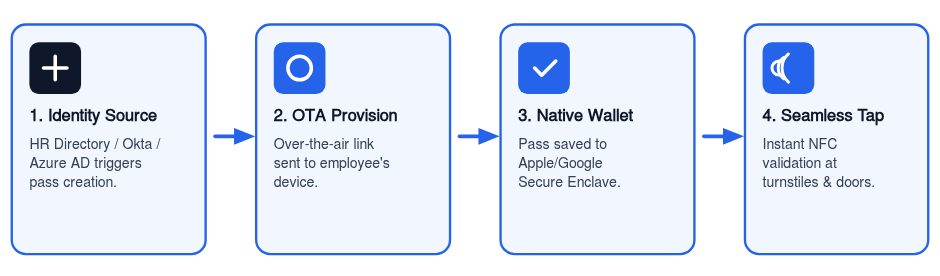
Cloud issuance: when a new team member is added to the HR system, an automated invitation delivers the pass to their smartphone by email, SMS or employee app.
Hardware-level security: the pass is bound to the smartphone’s Secure Element chip, so the credential cannot be copied, forwarded or exported to another device.
Encrypted door access: when tapped against a reader, the pass uses rotating keys to verify permissions without exposing private employee data.
Real-time revocation: when an employee changes roles or leaves, revoking access in your central IdP removes the pass from their phone, with no physical card to retrieve.
4 Ways Companies Use Digital Wallet Passes
Companies are moving beyond simple door access to give their teams one consolidated mobile experience.
1. Frictionless Access Control
Employees tap their smartphone or smartwatch to open facility gates, office turnstiles, parking garages, elevators and restricted areas.
2. Dynamic Visual Employee IDs
In shared office buildings or campuses, security staff need to verify identities visually. Digital wallet passes can show a photo, a status label such as "Active Employee" and barcodes for checking out IT equipment or booking meeting rooms.
3. Expense Cards and Employee Benefits
Instead of plastic cards or paper vouchers, companies can give employees digital wallet passes for:
Daily meal allowances in the company cafeteria
Monthly commuting and transit subsidies
Health, wellness and conference travel budgets
The balances update in the pass whenever a transaction takes place.
4. Contractor and Visitor Management
Managing external vendors or temporary workers used to mean handing out plastic visitor tags that nobody tracked. With digital passes, visitors receive a temporary wallet pass valid only for specific hours and floors. When the visit ends, the pass expires automatically.
Physical Cards vs. Digital Wallet Passes at a Glance
Why are security and HR teams phasing out traditional badges? Here is a direct comparison:
Feature | Physical Badges | Digital Wallet Passes |
Issuance | Printed and shipped, which takes days | Delivered to the phone in seconds |
Security | Easy to lose, copy or share | Bound to the device and protected by Face ID, fingerprint or passcode |
Cost per Badge | Card stock, printers, ribbons and shipping | No physical production costs |
Offboarding | The card has to be collected manually | Access is revoked remotely through the directory |
Key Employer Benefits: Cost, Security and Sustainability
Moving from physical keycards to digital passes brings benefits for IT, facilities, HR and finance teams.
1. Lower Costs and No Shipping Delays
Printing physical PVC badges involves hidden costs: card printers, ink ribbons, replacement badges, administrative work and postage for remote staff. Digital wallet passes have no physical production costs and reach employees anywhere in the world within seconds.
2. Closing the "Ghost Badge" Security Gap
When an employee leaves, a physical badge often stays with them. Even if it is deactivated in software, an uncollected badge remains a risk. With digital passes, deactivating the account in Microsoft Entra ID or Okta revokes the pass and removes it from the employee’s phone right away.
3. A Better Employee Experience
People rarely forget their smartphones. By bringing building access, ID badges and perks into native mobile wallets, employers remove daily friction at security gates and in the cafeteria.
4. Meeting ESG and Sustainability Targets
Dropping thousands of non-recyclable PVC cards and lanyards each year supports a company’s environmental, social and governance (ESG) goals.
How to Get Started with Digital Wallet Passes in Your Company
Moving to mobile wallet credentials is often simpler than companies expect:
Audit facilities and readers: make sure your access readers support modern NFC or BLE standards (for example OSDP-compliant hardware). Check with your access-control vendor which of your readers already support them.
Integrate identity systems: connect your digital wallet pass platform with your central directory (Azure AD, Okta, Workday) to automate the pass lifecycle.
Roll out in phases: start with a pilot for remote workers or selected locations before phasing out physical badges in all offices.
FAQ: Digital Wallet Passes for Employees
What is a corporate digital wallet pass?
An encrypted electronic badge stored in Apple Wallet or Google Wallet that replaces plastic ID and access cards.
Do employees need a separate app?
No. The pass lives in the phone’s native wallet, and the employee taps the phone or watch against the reader.
What happens when an employee leaves the company?
Access is revoked in the central directory and the pass is removed from the employee’s phone, so there is no physical card to collect.
Can visitors and contractors get wallet passes?
Yes. Visitors can receive a temporary pass that is valid only for specific hours and floors and expires automatically after the visit.
Do we need to replace our door readers?
Not always. Readers must support modern NFC or BLE standards, so start by checking your current hardware with your access-control vendor.
Make Your Workplace Keyless
The physical badge is becoming a thing of the past. With digital wallet passes, companies simplify IT operations, cut administrative costs and give employees a modern, secure experience at work.
Want to bring employee cards into Apple Wallet and Google Wallet? SmartPass by Sparados lets you issue branded employee passes, update them and void them as soon as they are no longer needed. Contact our team to see it in action.


